- AWS Cloud Deployment IAM Requirements
AWS Cloud Deployment IAM Requirements
Deploying Chalk to your AWS account.
Chalk’s feature platform with best-in-class developer experience enables machine learning teams to focus on building the unique products and models that make their business stand out. Chalk provides a feature store so that you can deploy production machine learning pipelines for real time data in minutes.
Chalk is both a framework and a platform — developers can write code using familiar Python packages, and deploy their feature and data pipeline definitions to Chalk’s platform. In the Customer Cloud deployment, Chalk runs & administers its platform on the customer’s cloud account. Chalk’s managed infrastructure then executes the customer defined pipelines to compute feature data for machine learning applications. Chalk then serves this data back to customer applications for online inference and to customer data teams for training set generation.
Architecture
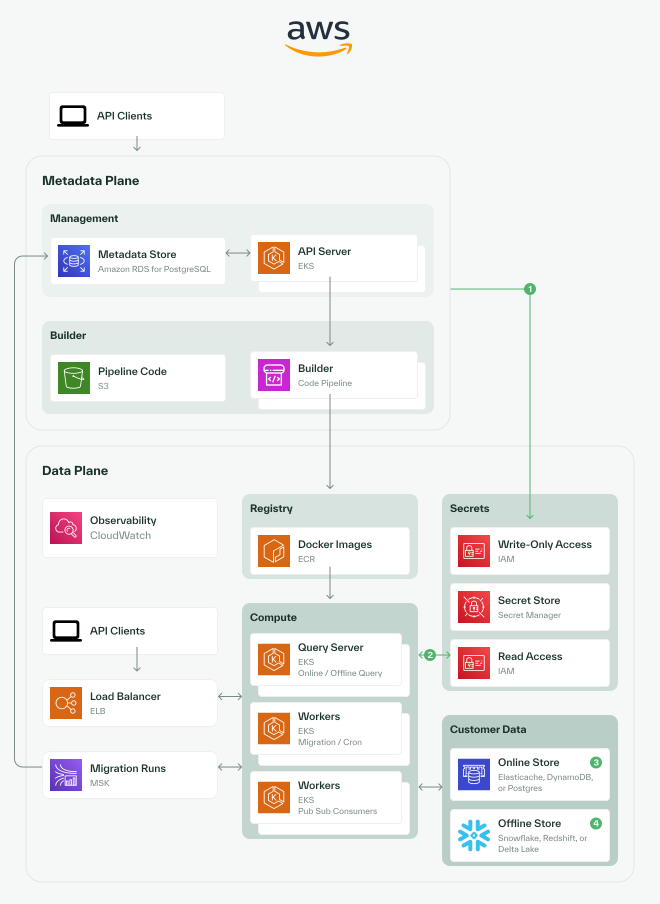
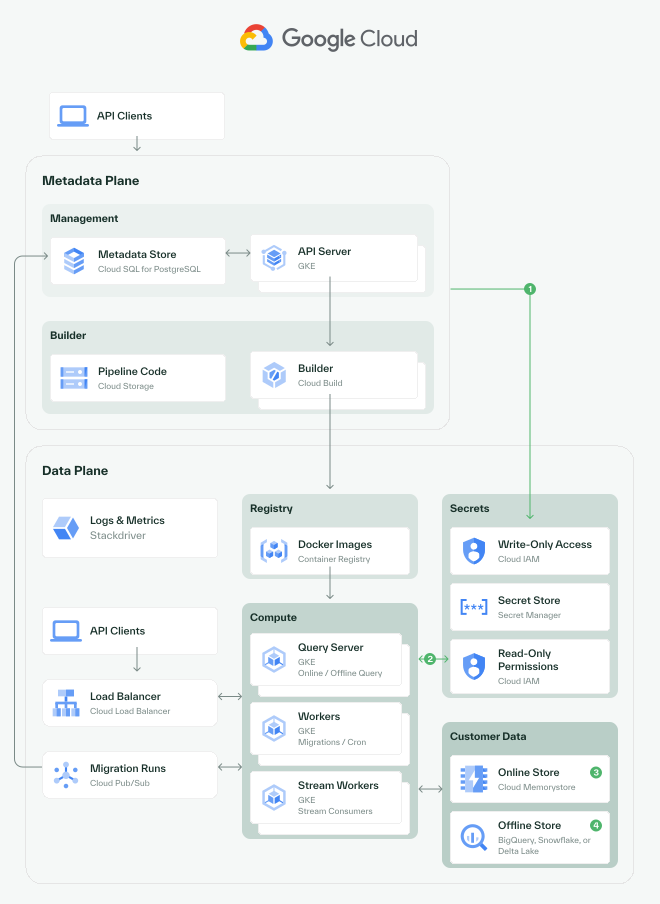
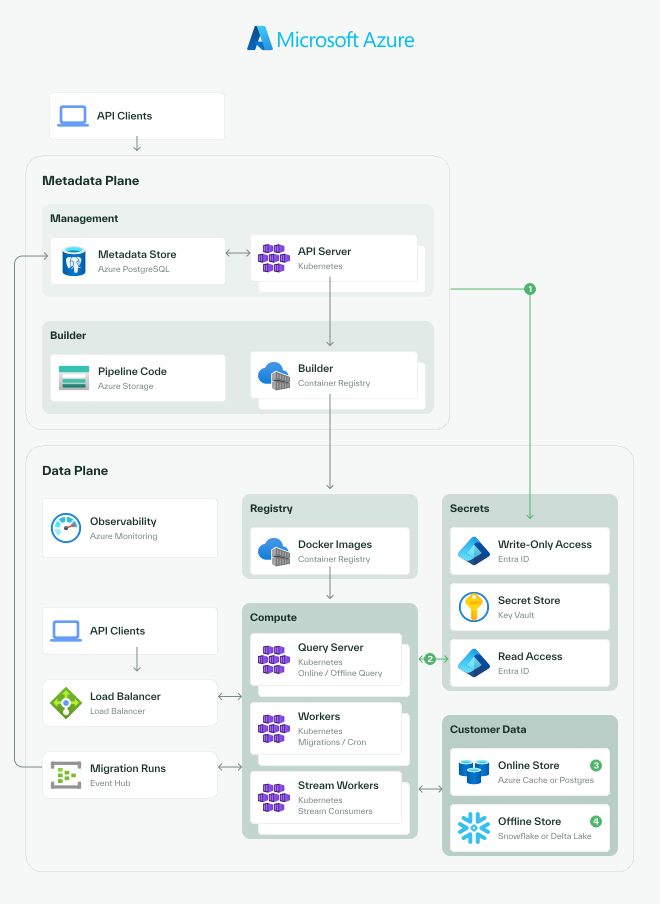
- 1Creating secrets:The API server can be configured to have write-only access to the secret store.
- 2Reading secrets:Secret access can be restricted entirely to the data plane.
- 3Online store:Chalk supports several online feature stores, which are used for caching feature values. On AWS, Chalk supports DynamoDB and Elasticache.
IAM Role Permissions
In order to manage infrastructure in your cloud account, Chalk requires certain IAM permissions. At a high level, Chalk needs the ability to provision the key components of your infrastructure:
- Storage resources (buckets for Dataset storage and bulk insertion into offline storage)
- Networking resources (LBs, VPCs, etc.)
- IAM resources (e.g. creating service accounts for workload identity, etc.)
- Kubernetes resources (EKS)
- Online storage (RDS, or Elasticache, or Dynamo)
- Offline storage (typically Snowflake, Iceberg, or Redshift)
Setup Instructions
We typically recommend the following steps for enabling Chalk to provision and manage AWS infrastructure in your cloud account:
- Create a new account in your AWS organization.
- Create a new role in the new account that enables Chalk’s server to perform actions in this account. Ensure that AssumeRole is granted.
{
    "Version": "2012-10-17",
    "Statement": [
        {
            "Effect": "Allow",
            "Principal": {
                "AWS": "arn:aws:iam::754784422779:role/chalk-api-server"
            },
            "Action": "sts:AssumeRole",
            "Condition": {
                "StringEquals": {
                    "sts:ExternalId": "<your-chalk-external-id>"
                }
            }
        }
    ]
}- Create an IAM policy using the JSON document below and attach this IAM policy to the created role.
{
    "Statement": [
        {
            "Resource": "*",
            "Action": [
                "sqs:*",
                "sns:*",
                "acm:*",
                "secretsmanager:*",
                "s3:*",
                "redshift:*",
                "redshift-data:*",
                "redshift-serverless:*",
                "rds:*",
                "logs:*",
                "kms:*",
                "kafkaconnect:*",
                "kafka:*",
                "kafka-cluster:*",
                "iam:CreateServiceLinkedRole",
                "iam:UploadServerCertificate",
                "iam:UploadSSHPublicKey",
                "iam:UpdateServerCertificate",
                "iam:UpdateRoleDescription",
                "iam:UpdateRole",
                "iam:UpdateOpenIDConnectProviderThumbprint",
                "iam:UpdateAssumeRolePolicy",
                "iam:RemoveRoleFromInstanceProfile",
                "iam:RemoveClientIDFromOpenIDConnectProvider",
                "iam:PutRolePolicy",
                "iam:PassRole",
                "iam:ListSSHPublicKeys",
                "iam:ListRoles",
                "iam:ListRolePolicies",
                "iam:ListRoleTags",
                "iam:ListPolicyVersions",
                "iam:ListPolicyTags",
                "iam:ListPolicies",
                "iam:ListOpenIDConnectProviders",
                "iam:ListOpenIDConnectProviderTags",
                "iam:ListAttachedRolePolicies",
                "iam:GetServerCertificate",
                "iam:GetSSHPublicKey",
                "iam:GetRolePolicy",
                "iam:GetRole",
                "iam:GetPolicyVersion",
                "iam:GetPolicy",
                "iam:GetOpenIDConnectProvider",
                "iam:GetInstanceProfile",
                "iam:DetachRolePolicy",
                "iam:DeleteServiceLinkedRole",
                "iam:DeleteServerCertificate",
                "iam:DeleteRolePolicy",
                "iam:DeleteRole",
                "iam:DeleteOpenIDConnectProvider",
                "iam:DeleteInstanceProfile",
                "iam:CreateServiceLinkedRole",
                "iam:CreateRole",
                "iam:CreatePolicyVersion",
                "iam:CreatePolicy",
                "iam:CreateOpenIDConnectProvider",
                "iam:CreateInstanceProfile",
                "iam:AttachRolePolicy",
                "iam:TagPolicy",
                "iam:TagRole",
                "iam:TagOpenIDConnectProvider",
                "iam:AddRoleToInstanceProfile",
                "iam:AddClientIDToOpenIDConnectProvider",
                "iam:ListInstanceProfilesForRole",
                "iam:DeletePolicy",
                "iam:UntagPolicy",
                "iam:UntagRole",
                "iam:UntagOpenIDConnectProvider",
                "elasticloadbalancing:*",
                "eks:*",
                "ecr:*",
                "ec2:*",
                "cloudwatch:*",
                "autoscaling:*",
                "dynamodb:*",
                "dax:*",
                "application-autoscaling:*",
                "elasticache:CreateCacheSubnetGroup",
                "elasticache:DeleteCacheSubnetGroup",
                "elasticache:DescribeCacheSubnetGroups",
                "elasticache:ModifyCacheSubnetGroup",
                "elasticache:CreateReplicationGroup",
                "elasticache:DeleteReplicationGroup",
                "elasticache:DescribeReplicationGroups",
                "elasticache:ModifyReplicationGroup",
                "elasticache:DescribeCacheClusters",
                "elasticache:AddTagsToResource",
                "elasticache:RemoveTagsFromResource",
                "elasticache:ListTagsForResource",
                "glue:*",
                "route53:*"
            ],
            "Effect": "Allow"
        },
        {
            "Resource": "*",
            "Action": [
                "iam:GetContextKeysForPrincipalPolicy",
                "iam:SimulatePrincipalPolicy"
            ],
            "Effect": "Allow"
        }
    ],
    "Version": "2012-10-17"
}What are these permissions for?
cloudwatch: The metrics viewer in the web UIlogs: Logs for the web UIacm: Provisioning SSL certs for client<>server encryptionrds: RDS Online storeredshift: Redshift offline storeredshift-data: Redshift offline storeredshift-serverless: Redshift offline storekafka: Asynchronous persistence queues for metrics & feature storagekafka-cluster: Asynchronous persistence queues for metrics & feature storagedynamodb: DynamoDB online storedax: DynamoDB online storeapplication-autoscaling: DynamoDB online store, if auto-scaling is requiredec2: ALB and EKS node pool managementecr: ECR image management for deploymentseks: EKS cluster management for running feature engineering workloadskms: Encryption keys for secretssecretsmanager: Encrypting data source secrets from the web UIglue: Iceberg Glue offline storeiam:GetContextKeysForPrincipalPolicy,iam:SimulatePrincipalPolicy: Checking the effective permissions of Chalk’s IAM role without executing the simulated actions
Ongoing permissions
Chalk’s support team will work with you to scope permissions down to what are needed for ongoing maintenance. The precise details depend on the level of ongoing support that your team needs and your compliance requirements. In principle, Chalk does not require ongoing access to data, or to the ability to edit IAM permissions, but Chalk requires ongoing access to update the software deployed in your environment. For managing resource configurations such as autoscaling, the Chalk team can use an execution role that is scoped to the specific resources that Chalk manages.
The scoped execution role uses resource tagging
to restrict permissions to only resources managed by Chalk (tagged with chalk.ai/managed-by: chalk).
This provides a secure way to limit Chalk’s access to only the infrastructure it creates and maintains.
For AWS maintenance, Chalk plans and applies with Terraform refresh disabled, using the last recorded state
to detect configuration changes. These runs do not detect out-of-band changes to managed resources, and Terraform
still reads data sources. Changes that create, update, or delete IAM resources require an IAM-capable execution
role; the scoped role below covers runs without IAM changes.
This policy assumes setup is complete. It supports upgrades to existing EKS clusters and node groups,
Helm upgrades, and ongoing access to container images, storage, and secrets. Setup and discovery,
IAM permission simulation, CloudWatch metrics and logs, and DynamoDB and ElastiCache dashboard
metadata are outside this scope. The kms:Decrypt permission supports reading existing Kafka
credentials encrypted with customer-managed keys. Creating or changing KMS keys requires a separately
authorized role.
The IAM policy for the scoped execution role is composed of the following statements:
{
  "Version": "2012-10-17",
  "Statement": [
    {
      "Sid": "ChalkManagedResources",
      "Effect": "Allow",
      "Action": [
        "eks:*",
        "ecr:*",
        "ec2:*",
        "secretsmanager:*",
        "kms:Decrypt"
      ],
      "Resource": [
        "arn:aws:eks:${AWS_REGION}:${AWS_ACCOUNT_ID}:*",
        "arn:aws:ecr:*",
        "arn:aws:ec2:${AWS_REGION}:${AWS_ACCOUNT_ID}:*",
        "arn:aws:secretsmanager:${AWS_REGION}:${AWS_ACCOUNT_ID}:*",
        "arn:aws:kms:${AWS_REGION}:${AWS_ACCOUNT_ID}:*"
      ],
      "Condition": {
        "StringEquals": {
          "aws:ResourceTag/chalk.ai/managed-by": "chalk"
        }
      }
    },
    {
      "Sid": "ChalkUntaggedResources",
      "Effect": "Allow",
      "Action": [
        "s3:*"
      ],
      "Resource": [
        "arn:aws:s3:::chalk-*"
      ]
    },
    {
      "Sid": "ChalkGlobalDescribe",
      "Effect": "Allow",
      "Action": [
        "ecr:GetAuthorizationToken",
        "ecr:Describe*",
        "ec2:Describe*"
      ],
      "Resource": "*"
    },
    {
      "Sid": "ChalkRunInstances",
      "Effect": "Allow",
      "Action": "ec2:RunInstances",
      "Resource": [
        "arn:aws:ec2:${AWS_REGION}:${AWS_ACCOUNT_ID}:instance/*",
        "arn:aws:ec2:${AWS_REGION}:${AWS_ACCOUNT_ID}:volume/*",
        "arn:aws:ec2:${AWS_REGION}:${AWS_ACCOUNT_ID}:network-interface/*",
        "arn:aws:ec2:${AWS_REGION}:${AWS_ACCOUNT_ID}:subnet/*",
        "arn:aws:ec2:${AWS_REGION}:${AWS_ACCOUNT_ID}:security-group/*",
        "arn:aws:ec2:${AWS_REGION}::image/*",
        "arn:aws:ec2:${AWS_REGION}::snapshot/*"
      ]
    },
    {
      "Sid": "ChalkTagOnCreate",
      "Effect": "Allow",
      "Action": "ec2:CreateTags",
      "Resource": [
        "arn:aws:ec2:${AWS_REGION}:${AWS_ACCOUNT_ID}:instance/*"
      ],
      "Condition": {
        "StringEquals": {
          "ec2:CreateAction": "RunInstances"
        }
      }
    }
  ]
}
Most permissions are gated by the aws:ResourceTag/chalk.ai/managed-by condition. The following statements use other restrictions:
- S3 buckets (
ChalkUntaggedResources): restricted by the existingchalk-*name pattern. - ECR and EC2 reads (
ChalkGlobalDescribe): permit image authentication and metadata lookup, and reads of existing network configuration. ec2:RunInstances(ChalkRunInstances): the instance, volume, and network interface it creates have no tags yet. EKS AMIs and their snapshots are AWS-owned. Subnets and security groups are included to support untagged network resources.ec2:CreateTags(ChalkTagOnCreate): limited to tagging instances duringRunInstancesthrough theec2:CreateActioncondition.
Kubernetes
Chalk requires the following Kubernetes roles to manage the resources in your cluster:
Managed Components
Depending on cluster settings and enabled Chalk features, AWS customer-cloud deployments manage the following Kubernetes platform components in EKS.
EKS Add-ons
Helm Charts
- Argo Workflows
- CloudNativePG
- Envoy Gateway
- Karpenter
- KEDA
- external-dns
- metrics-server
- aws-mountpoint-s3-csi-driver
- cert-manager
- AWS Load Balancer Controller
EKS Version Support
Chalk supports EKS versions up to two Kubernetes minor versions back, and Chalk updates managed clusters approximately one month before the end of AWS standard support for the in-use EKS version.
kind: ClusterRole
apiVersion: rbac.authorization.k8s.io/v1
metadata:
  name: chalk-cluster-management-role
rules:
  - apiGroups:
      - ""
    resources:
      - nodes # required to track usage
    verbs:
      - get
      - list
      - watch
  # For allowing the web UI to manage cluster scaling
  - apiGroups:
      - "karpenter.sh"
    resources:
      - nodepools
    verbs:
      - get
      - list
      - create
      - update
      - patch
      - delete
  - apiGroups:
      - "karpenter.k8s.aws"
    resources:
      - ec2nodeclasses
    verbs:
      - get
      - list
      - create
      - update
      - patch
      - delete

  # For read/list access to Karpenter NodeClaims
  - apiGroups:
      - "karpenter.sh"
    resources:
      - nodeclaims
    verbs:
      - get
      - list

  - apiGroups:
      - ""
    resources:
      - persistentvolumes
    verbs:
      - get
      - list
      - create
      - update
      - patch
      - watch
      - delete

  - apiGroups:
      - "storage.k8s.io"
    resources:
      - storageclasses
    verbs:
      - get
      - list

---
kind: Role
apiVersion: rbac.authorization.k8s.io/v1
metadata:
  name: chalk-management-role
  namespace: <namespace> # replace <namespace> with your actual namespace
rules:
  - apiGroups:
      - ""
    resources:
      - configmaps
      - pods
      - services
    verbs:
      - get
      - list
      - create
      - update
      - patch
      - watch

  # For support w/ debugging & rendering logs in the dashboard.
  - apiGroups:
      - ""
    resources:
      - pods/log
    verbs:
      - get
      - list
      - watch
  - apiGroups:
      - "extensions"
      - "networking.k8s.io"
    resources:
      - ingresses
      - ingresses/status
      - ingressclasses
    verbs:
      - get
      - list
      - watch
      - delete
      - update
      - create
  - apiGroups:
      - "extensions"
      - "networking.k8s.io"
    resources:
      - ingresses # can be self-managed if necessary
    verbs:
      - get
      - create
      - delete
      - update
      - list
      - patch
  - apiGroups:
      - ""
    resources:
      - secrets
    verbs:
      - get
      - list
      - watch
      - create
      - patch
      - update
      - delete
  - apiGroups:
      - ""
    resources:
      - events
    verbs:
      - get
      - list
      - watch
  - apiGroups:
      - "apps"
    resources:
      - replicasets
      - statefulsets
      - deployments
      - daemonsets
    verbs:
      - get
      - list
      - update
      - patch
      - create
      - delete
  - apiGroups:
      - "batch"
    resources:
      - cronjobs
    verbs:
      - get
      - list
      - create
      - update
      - patch
      - watch
      - delete

  # For managing Jobs
  - apiGroups:
      - "batch"
    resources:
      - jobs
    verbs:
      - get
      - list
      - create
      - update
      - patch
      - watch
      - delete

  # For durable storage management.
  - apiGroups:
      - ""
    resources:
      - persistentvolumeclaims
    verbs:
      - get
      - list
      - create
      - update
      - patch
      - watch
      - delete
  # For managing KEDA objects for autoscaling.
  - apiGroups:
      - keda.sh
    resources:
      - scaledobjects
      - scaledjobs
    verbs:
      - get
      - list
      - create
      - update
      - patch
      - watch
      - delete
  # For managing PodDisruptionBudgets.
  - apiGroups:
      - policy
    resources:
      - poddisruptionbudgets
    verbs:
      - get
      - list
      - create
      - update
      - patch
      - watch

  # OPTIONAL: For showing thread dumps & profiling for batch backfills + some support use-cases.
  - apiGroups:
      - ""
    resources:
      - pods/exec
    verbs:
      - create
      - get

  # OPTIONAL: For support with debugging k8s rbac, grant read-only access to this namespaces' rbac configuration.
  - apiGroups: ["", "rbac.authorization.k8s.io"]
    resources: ["roles", "serviceaccounts", "rolebindings"]
    verbs: ["get", "list"]
Additionally, Chalk workload service accounts require the following role to be able to manage batch workloads:
apiVersion: rbac.authorization.k8s.io/v1
kind: Role
metadata:
  name: chalk-job-reader
  namespace: <namespace>  # replace <namespace> with your actual namespace
rules:
- apiGroups: ["batch"]
  resources: ["jobs"]
  verbs: ["get", "list", "watch"]
If you use in-cluster docker image building powered by kaniko and Argo, Chalk requires this role on the namespace where the docker image building is happening:
apiVersion: rbac.authorization.k8s.io/v1
kind: Role
metadata:
  name: argo-workflows-role
  namespace: <namespace>  # replace <namespace> with your actual namespace
rules:
- apiGroups: ["argoproj.io"]
  resources: ["workflows"]
  verbs: ["get", "list", "watch", "create", "update", "patch", "delete"]
- apiGroups: [""]
  resources: ["pods"]
  verbs: ["get", "list", "watch", "create", "update", "patch", "delete"]
This role must be granted to the management service account that Chalk uses to manage the cluster, and to the workload service account that runs the docker image building.
Logging
In order to display logs in the Chalk web UI, Chalk requires permissions to be able to read Cloudwatch logs. If you use a separate logging service, you can set up Fluent Bit as a DaemonSet to send logs to CloudWatch Logs. Then, to view these logs we need the following permissions:
{
    "Statement": [
        {
            "Action": [
                "logs:TestMetricFilter",
                "logs:StartQuery",
                "logs:StartLiveTail",
                "logs:List*",
                "logs:Get*",
                "logs:FilterLogEvents",
                "logs:Describe*"
            ],
            "Effect": "Allow",
            "Resource": "arn:aws:logs:us-east-1:<your account id>:log-group:<the log group path>:*",
            "Sid": "readlogs"
        },
        {
            "Action": [
                "logs:StopQuery",
                "logs:StopLiveTail"
            ],
            "Effect": "Allow",
            "Resource": "*",
            "Sid": "stopActions"
        }
    ],
    "Version": "2012-10-17"
}VPC CIDR Blocks
Chalk will create the underlying VPC and subnets for the EKS cluster(s) for your Chalk deployment. Typically, Chalk will request a /16 address block and work within it. However, the number of addresses will depend on the size of your implementation. The Chalk team will work with you to determine the appropriate CIDR sections to use.
Our default configuration is:
vpc_cidr_block = "10.130.0.0/16"
vpc_subnets = [
  {
    name              = "primary"
    cidr_block        = "10.130.0.0/20"
    az                = "a"
    public_cidr_block = "10.130.16.0/20"
  },
  {
    name              = "secondary"
    cidr_block        = "10.130.32.0/20"
    az                = "b"
    public_cidr_block = "10.130.48.0/20"
  },
  {
    name              = "tertiary"
    cidr_block        = "10.130.64.0/20"
    az                = "c"
    public_cidr_block = "10.130.80.0/20"
  }
]