Compute
Chalk Compute
Run sandboxes, agents, and inference workloads on managed or self-hosted infrastructure.
Overview
Chalk Compute is a sandbox runtime for running arbitrary workloads — AI agents, model inference, data pipelines, or any long-running process — in isolated, sandboxed environments. Workloads can run on Chalk’s managed serverless fleet or on your own EKS/GKE clusters.
To use Compute on a cluster, follow the Compute Setup guide.
Then install the SDK to get started:
pip install chalkcomputeCompute fits into the broader Chalk platform alongside the Context Engine and MCP Gateway. Your application talks to the platform from outside the VPC; all workload code, data sources, and credentials stay inside it.
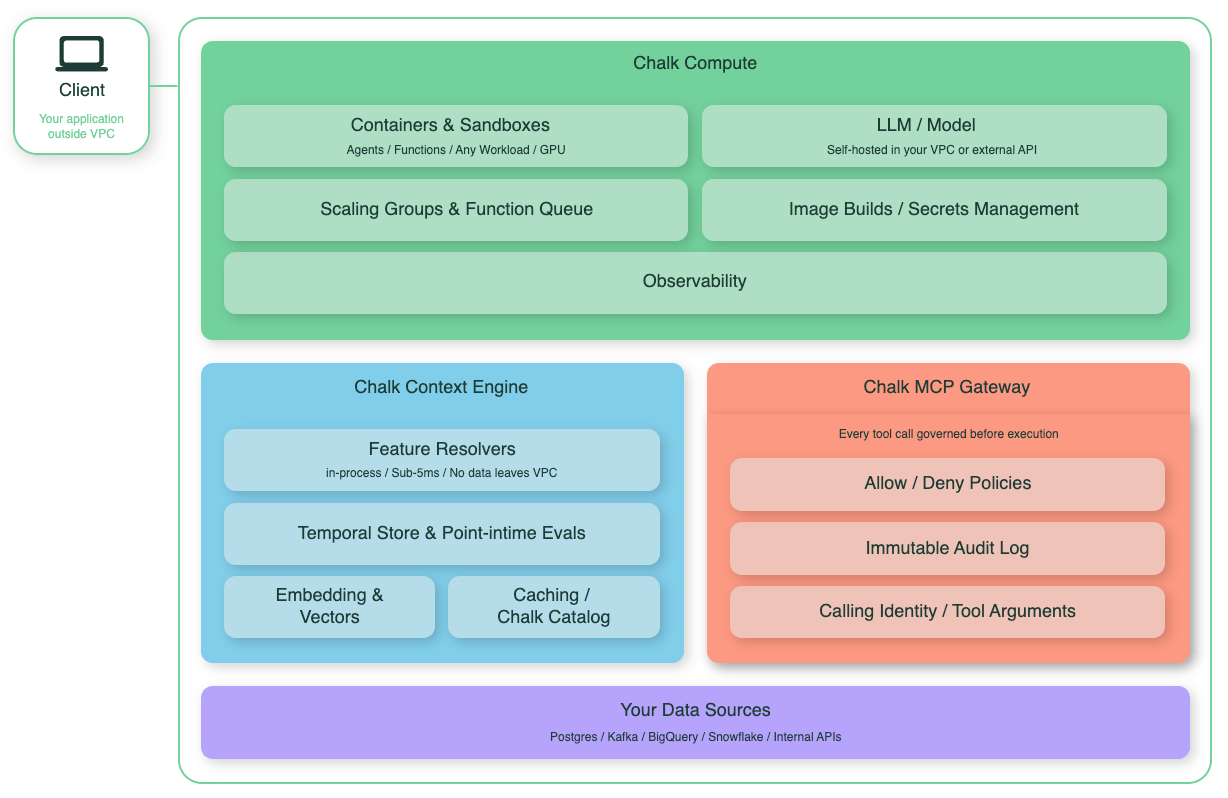
Core primitives
Every Compute workload is one of three shapes:
Sandbox: an isolated environment for a single ephemeral task, torn down when the task finishes.ScalingGroup: a replicated, HTTP-fronted service that stays running and autoscales.Function: a Python callable, deployed once and invoked remotely.
The rest of this page covers how to choose between them, then walks through each in depth.
Choosing the right primitive
| Mental Model | Reach For | Example |
|---|---|---|
| An ephemeral task | Sandbox | Run an agent’s generated code, a one-off data backfill, or a per-session agent workspace that is torn down when the session ends |
| An application that lives forever | ScalingGroup | A vLLM inference server, an internal API, a persistent agent or chat backend, or a hosted MCP server |
| A (potentially long) RPC call | Function | An embedding or re-ranking endpoint, an enrichment call inside a resolver, or a “score this transaction” call that returns a float to the query server |
A Sandbox is an ephemeral task. Reach for a sandbox
by default. For a long-running process that needs to be reachable over HTTP,
use a Scaling Group.
The diagram below shows how these primitives sit inside a Chalk-managed deployment in your cloud account. Sandboxes and scaling groups run on a gVisor-hardened nodepool; image builds, the function registry, secrets, and volumes are all reachable from the same VPC; clients can hit the API Server directly, the Envoy router for HTTP traffic into a scaling group, or the Function Queue for async invocations.
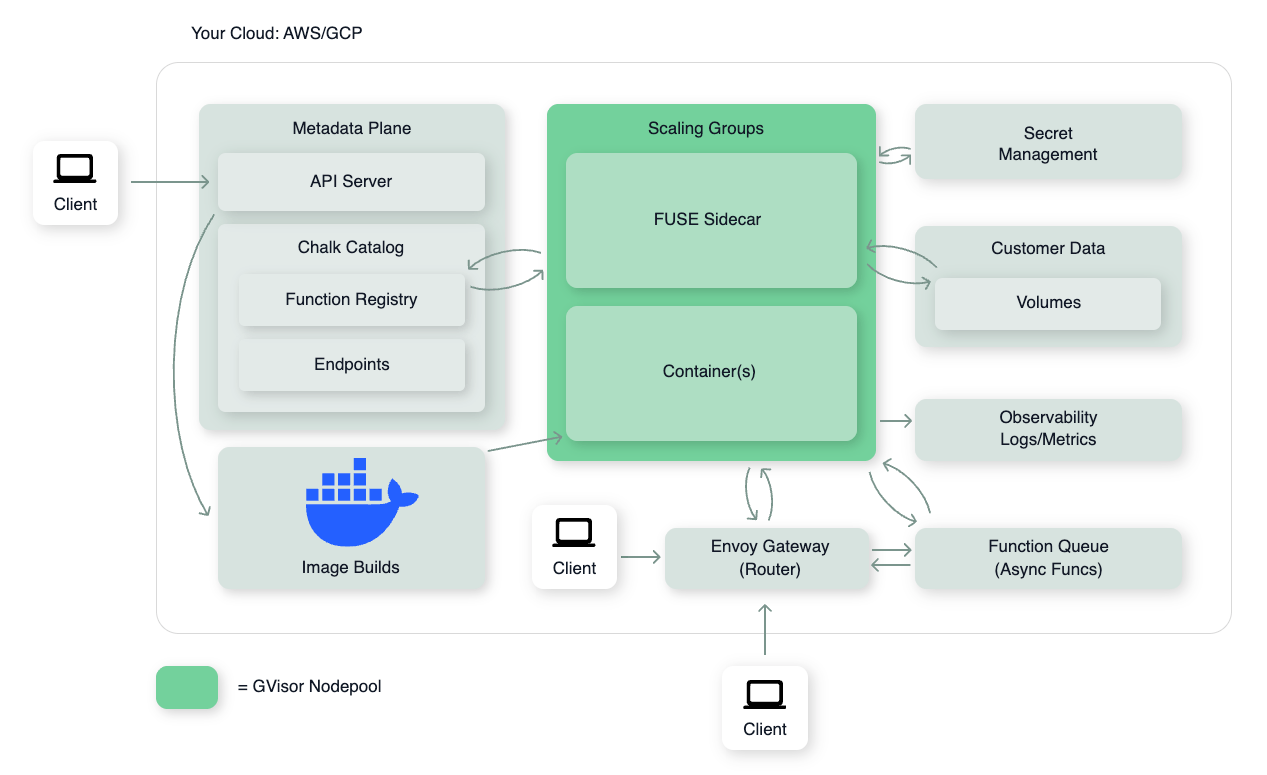
Primitives in depth
The examples below run as written against Chalk’s managed serverless fleet. Running on your own EKS or GKE cluster instead requires the Compute Setup step covered above; the primitive APIs themselves don’t change.
Sandboxes
Every workload runs in a gVisor-isolated sandbox with its own filesystem, network namespace, and resource limits. Sandboxes support CPU and GPU workloads, enforce multi-tenant isolation at the kernel level, and can be deployed on managed infrastructure or self-hosted Kubernetes.
import chalkcompute

sandbox = chalkcompute.Sandbox(
    image=chalkcompute.Image.debian_slim(),
    cpu="2",
    memory="4Gi",
).run()
result = sandbox.exec("python", "-c", "print('hello from a sandbox')")
print(result.stdout_text)
sandbox.terminate()Scaling Groups
Scaling Groups deploy a replicated, HTTP-fronted service with autoscaling and an automatically provisioned DNS name. Use them for inference servers, internal APIs, agent backends, and any long-lived service that needs to be reachable from outside the cluster.
import chalkcompute

sg = chalkcompute.ScalingGroup(
    image=chalkcompute.Image.debian_slim("3.12").entrypoint(
        ["python", "-m", "http.server", "8080"]
    ),
    name="hello-api",
    port=8080,
    min_replicas=1,
    max_replicas=3,
    startup_probe=chalkcompute.StartupProbe.http("/"),
).deploy()

resp = sg.call("/", method="GET")
print(resp.status)
sg.delete()Functions
Functions let you deploy a Python callable as a remotely invocable endpoint. Chalk handles image building, scaling, and routing. You write a function, deploy it, and call it from anywhere.
import chalkcompute

@chalkcompute.function(cpu="1", memory="1Gi")
def normalize_name(name: str) -> str:
    return " ".join(part.capitalize() for part in name.split())

normalize_name.wait_ready()
print(normalize_name("ada lovelace"))  # Ada Lovelace
Under the hood, a Function deploys your callable onto a Scaling Group and
registers it in the Chalk Catalog. Once registered, it’s reachable from the
rest of Chalk: call it from Chalk SQL, from a resolver, from the query
server, or from a DataFrame via F.catalog_call(). Functions also pick up
runtime features that a Scaling Group does not provide on its own: async
invocation, streaming results, nested calls, automatic retries, concurrency
caps, rate limits, and request-queue-driven autoscaling.
Use a Function when the workload needs to participate in the feature engine, or when you want those runtime controls without wiring them yourself on a Scaling Group. Common cases:
- Python callable reachable from Chalk SQL, resolvers, the query server, or a DataFrame
- Async / streaming / nested calls with batching, retries, concurrency, or rate-limit controls
Supporting building blocks
Sandboxes, Scaling Groups, and Functions are the three things you choose between. Each of the four building blocks below always attaches to one of the three primitives above; none of them runs on its own.
| Building block | Use case |
|---|---|
Image | Define the software environment baked into a workload (pip packages, system deps, local files) |
Volume | Persistent, versioned, copy-on-write storage shared across workloads or runs |
Secret | Inject credentials into a workload as environment variables |
| Security controls | Identity and networking controls for production workloads |
Images
Images define the software environment for a sandbox. The Image
API provides a fluent builder for installing pip packages, system dependencies, and local
files. Images are content-addressed: identical specs share a cached build, and incremental
changes only rebuild affected layers.
img = (
    chalkcompute.Image.debian_slim("3.12")
    .pip_install(["torch", "transformers"])
    .run_commands(
        "apt-get update",
        "apt-get install -y ffmpeg",
    )
)Volumes
Volumes provide persistent, versioned file storage backed by object storage. A Rust-based FUSE driver mounts volumes directly into sandboxes as normal directories. Writes use batch copy-on-write semantics. Changes are buffered locally and flushed on sync, giving other consumers a consistent view. Past versions are retained, enabling fork semantics for parallel agent workloads.
import chalkcompute

vol = chalkcompute.Volume("training-data")
vol.put_file("inputs/example.txt", b"hello from a volume\n")

sandbox = chalkcompute.Sandbox(
    image=chalkcompute.Image.debian_slim("3.12"),
    name="volume-demo",
    volumes=[("training-data", "/data")],
).run()
result = sandbox.exec("python3", "-c", "print(open('/data/inputs/example.txt').read())")
print(result.stdout_text)
sandbox.terminate()Secrets
Secrets inject credentials into a workload without
putting them in source code or an image. Pass a list of Secret references
to any primitive’s secrets parameter; each is resolved at deploy time and
exposed as an environment variable.
import chalkcompute

secrets=[
    chalkcompute.Secret.from_chalk_env("OPENAI_API_KEY"),
    chalkcompute.Secret.from_chalk_integration("prod_postgres"),
]Security
The Security section of the Sandbox doc covers the identity and networking controls available for production workloads: workload identity federation (OIDC-compliant per-sandbox credentials), the MCP Gateway for proxying tool-use APIs without exposing real credentials, and network policies that set which destinations a sandbox can reach. To connect to a sandbox from your own machine, use Tunnels.