- Infrastructure
- Metadata Plane & Data Plane Communication
Infrastructure
Metadata Plane & Data Plane Communication
What data flows between the Chalk Metadata Plane and Data Plane, and what the security implications are.
Chalk’s service architecture is divided into two planes: the Metadata Plane and the Data Plane. Understanding what flows between them is critical for security-conscious deployments, especially when configuring data residency controls or auditing what can transit outside your cloud boundary.
Key principle: The Metadata Plane orchestrates the Data Plane but never stores customer feature values. All production query traffic flows directly from your API clients to the Data Plane.
Summary of Data Flows
| Flow | Direction | Contains Customer Data? | Required? | Can Be Disabled? |
|---|---|---|---|---|
| Logs | Data → Metadata | No (metadata only) | No | Yes |
| Metrics | Data → Metadata | No | No | Yes |
| Query Execution | Metadata → Data | Yes (feature values) | No | Yes |
| EKS API Access | Metadata → Data | No | Yes | No |
| Container Images (ECR/Artifact Registry) | Metadata → Data | No | Yes | No |
Data Flows In Detail
Logs
Direction: Data Plane → Metadata Plane
Logs are collected by an OpenTelemetry Collector running in the Data Plane EKS/GKE cluster and optionally forwarded to the Metadata Plane for centralized dashboarding.
What’s included:
- Application logs from query servers, stream workers, and batch workers
- Resolver execution logs (which features were computed and when)
- Error logs and exception traces
- Query audit logs
What’s NOT included: Actual feature values or customer PII. Logs contain metadata about computations (e.g. resolver name, latency, error type), not the data itself.
Disabling: Logs can be kept exclusively within the Data Plane by configuring the OpenTelemetry Collector to export to your own observability tooling (e.g. Dynatrace, Datadog) instead of forwarding to the Metadata Plane.
Metrics
Direction: Data Plane → Metadata Plane
Performance and operational metrics are emitted by the Data Plane and optionally forwarded for centralized monitoring.
Metrics collected:
- Query latency (P50, P95, P99)
- Query success and error rates
- Ingestion delay (time from event to feature availability in the online store)
- Kafka consumer lag
- Cache hit rates
- Resource utilization (CPU, memory, disk)
Metrics do not contain customer data — only aggregated operational statistics.
Disabling: Like logs, metrics can be routed exclusively to your own monitoring systems via OpenTelemetry exporter configuration.
Query Execution
Direction: Metadata Plane → Data Plane
This flow is what enables the Chalk web UI to execute queries interactively against your live data plane: the UI sends a request to the Metadata Plane, which forwards it as an API client to your Data Plane, and returns the results.
What’s included: Query inputs, feature outputs, and execution plan metadata. This flow can transmit customer feature values (including PII).
Disabling: This flow requires a VPC Endpoint (VPCE / PrivateLink) between the Metadata Plane and Data Plane. Removing that connection disables it entirely, ensuring customer data never transits to the Metadata Plane.
What you lose by disabling this flow
Disabling query execution connectivity is not a simple on/off toggle — it removes a significant portion of Chalk’s product capabilities:
- Planning and backfill engines: aggregate backfill planning, historical feature computation scheduling, and incremental update strategies require the Metadata Plane to be able to query the Data Plane
- Web UI query testing: interactive query debugging and feature value inspection
- Real-time monitoring dashboards: feature freshness views and query plan visualization
- Data quality tooling: automated health checks, feature assertions, and resolver performance analysis
What is never affected
Regardless of how you configure Metadata-to-Data-Plane connectivity, production online query traffic is not affected. When using Named Queries, your API clients talk directly to the Data Plane and never route through the Metadata Plane. OAuth token exchange still occurs via the Metadata Plane, but no feature values transit it.
EKS API Access
Direction: Metadata Plane → Data Plane
The Metadata Plane needs access to your Data Plane’s Kubernetes API server to manage the lifecycle of your Chalk deployment.
What it’s used for:
- Deploying updated container images (built by Argo Image Builder)
- Scaling Kubernetes workloads (query servers, stream workers, batch workers)
- Executing rolling updates with zero downtime
- Monitoring pod health and readiness states
What’s NOT included: No customer feature data is exposed via the Kubernetes API — only infrastructure metadata (pod status, deployment state, etc.).
Disabling: This flow is required. Without it, Chalk cannot deploy code changes, scale resources, or perform health monitoring.
EKS API access patterns
There are two main options for how the Metadata Plane connects to the Data Plane Kubernetes API:
Option A: Public EKS API with IP whitelisting (recommended)
The EKS API server endpoint is publicly accessible, but access is restricted to the Chalk Metadata Plane’s IP ranges via whitelist. All traffic is encrypted in transit (TLS), and AWS IAM authentication is required for all API calls.
Benefits: simpler setup, zero-downtime deployments guaranteed, no dependency on VPC Endpoint infrastructure.
Option B: Fully private EKS API
The EKS API server is only accessible from within the VPC. If the Metadata Plane and Data Plane are in separate VPCs, this requires VPC peering or Transit Gateway. See Private EKS API Server Connectivity for the full topology and configuration walkthrough.
Drawbacks: operationally complex, and zero-downtime deployments cannot be guaranteed because EKS API endpoints don’t have stable IP addresses — a change in endpoint IP can break connectivity until network rules are manually updated (estimated recovery: 15+ minutes).
This option is typically only warranted when regulatory requirements mandate a fully private control plane.
Container Images
Direction: Metadata Plane → Data Plane
When you deploy a new version of your Chalk project, the Metadata Plane’s Argo Image Builder builds Docker container images and pushes them to your ECR (AWS) or Artifact Registry (GCP) repository. The Data Plane then pulls these images when deploying.
What’s included: Docker container images for Chalk services. No customer feature data.
Disabling: This flow is required for deployments.
Direct Communication with Data Plane
Direction: Customer API Client → Data Plane (with auth token exchange via Metadata Plane)
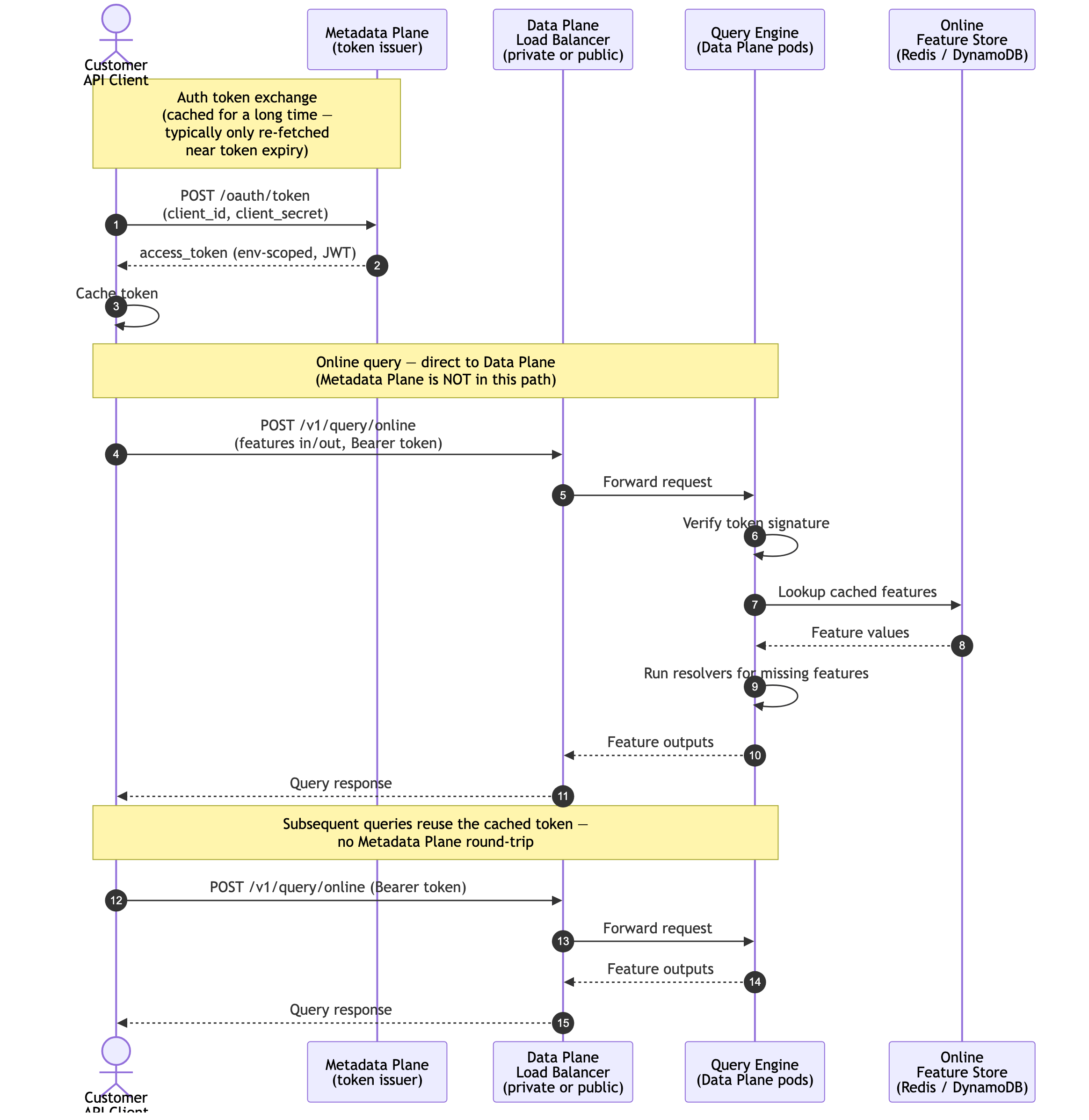
Production query traffic from customer-owned API clients does not flow through the Metadata Plane. Instead, customer-owned API clients:
- Exchange an auth token with the Metadata Plane. The client authenticates against the Metadata Plane (typically via OAuth client credentials) and receives an access token scoped to the target environment. Tokens are intended to be cached by the client for a long time — typically only re-fetched as they near expiry — so the Metadata Plane is in the request path only on the rare token refresh, never on the hot path of queries or ingestion.
- Speak directly to the Data Plane’s load balancers. Using that token, the client issues query and ingestion requests directly to the Data Plane. The load balancer fronting the Data Plane may be either private (VPC-internal, accessed via PrivateLink, VPC peering, or on-prem connectivity) or public (internet-facing with TLS) — the choice is up to the customer based on their network and compliance posture. Public load balancers can additionally restrict access via IPv4 allowlists (e.g. AWS security groups or WAF IP set rules) to limit which client networks can reach the Data Plane.
This means feature values flow only between the customer’s API clients and their own Data Plane; the Metadata Plane sees the auth handshake but not the query payloads or results.
Online query traffic
Online queries are synchronous: the client posts inputs to the Data Plane and receives the computed feature values in the response. The auth token is exchanged once with the Metadata Plane (and cached), then reused across many queries against the Data Plane load balancer.
Offline query traffic
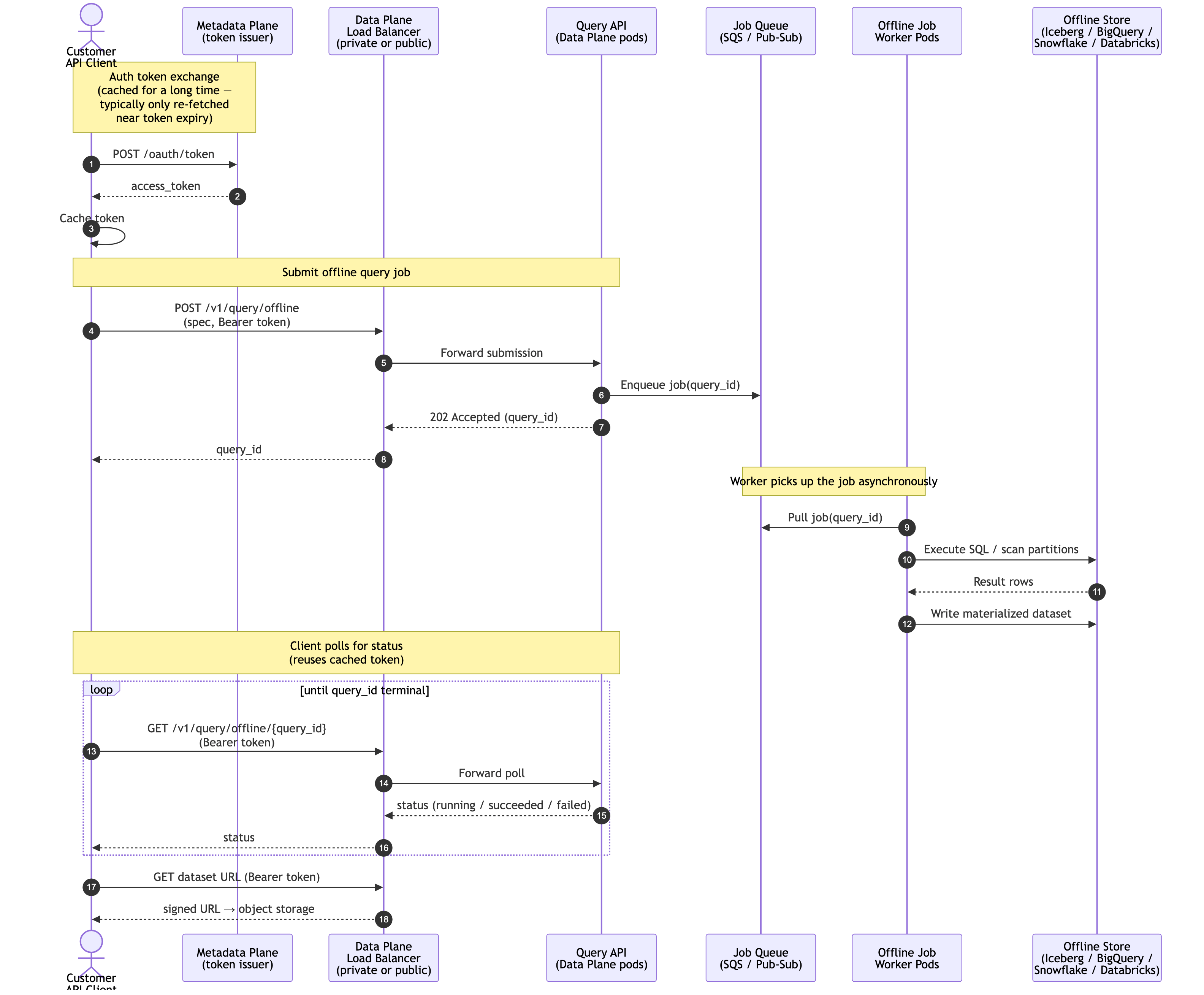
Offline (batch) queries are asynchronous. The client submits a job to the Data Plane, which enqueues it onto a job queue; an offline worker pod consumes the queue, runs the query against the offline store, and writes the result dataset. The client polls the Data Plane for status using the same cached token, and finally fetches the materialized dataset.
Direct ingestion (upload_features)
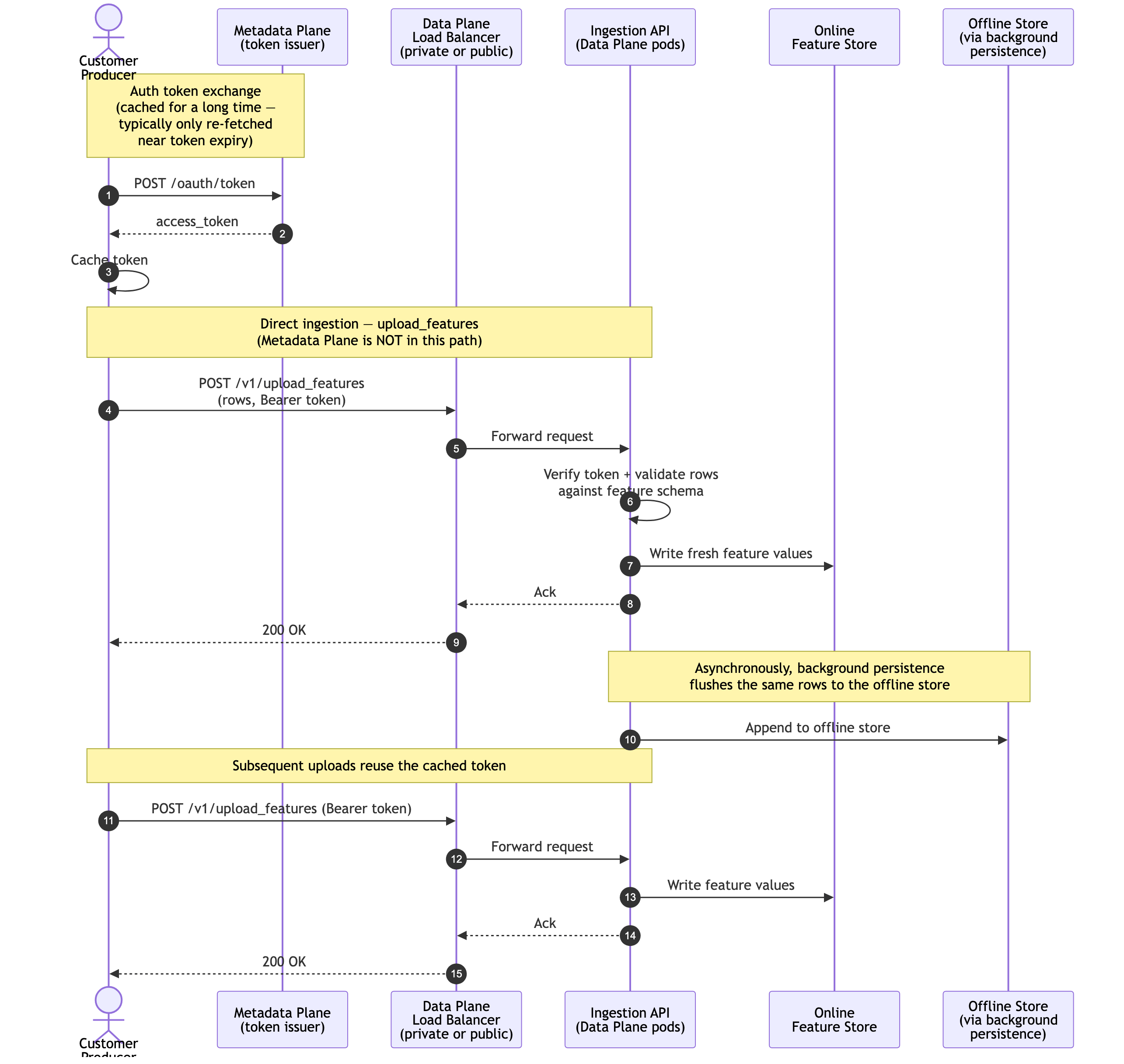
Producers can push feature values into the online store without going through a resolver
by calling the Data Plane’s upload_features endpoint. As with queries, the client first
exchanges an auth token with the Metadata Plane (cached for a long time), then sends rows
directly to the Data Plane load balancer. Background persistence asynchronously flushes
the same rows to the offline store.
Configuration Options
Chalk uses a shared gateway with a single load balancer for Chalk ingress. Depending on your security posture, there are multiple options for configuring connectivity to the Data Plane from the Metadata Plane.
Public connectivity (recommended)
For Public connectivity, the Data Plane Load balancer is internet facing, which allows both the Metadata Plane and data scientist to both easily talk to your Data Plane deployment. Chalk supports both IP whitelisting and TLS for stateful firewalls with encryption in transit. This is the simplest configuration and is recommended for most deployments.
Private connectivity (optional)
Establish a VPC Endpoint between the Metadata Plane and Data Plane, and rely on Chalk’s RBAC system for access control. This gives you full product functionality: planning engines, web UI query testing, real-time dashboards, and data quality tooling. This is done by creating a VPC Endpoint Service in the Data Plane attached to the primary gateway load balancer. Subsequently, Chalk will provision a VPC Endpoint in the Chalk Metadata Plane to facilitate fully private connectivity between the two Planes.