Chalk Installation (Helm)
Customer Cloud installation with Helm
Introduction
Chalk offers a hosted model (“Chalk Cloud”) and a customer-hosted model (“Customer Cloud”). Most companies choose to run Chalk in their own cloud using the Customer Cloud model. This page discusses the self-managed Customer Cloud Deployment (sometimes operated in “Air Gapped” style).
A Chalk deployment consists of a Metadata Plane and one or more Data Planes:
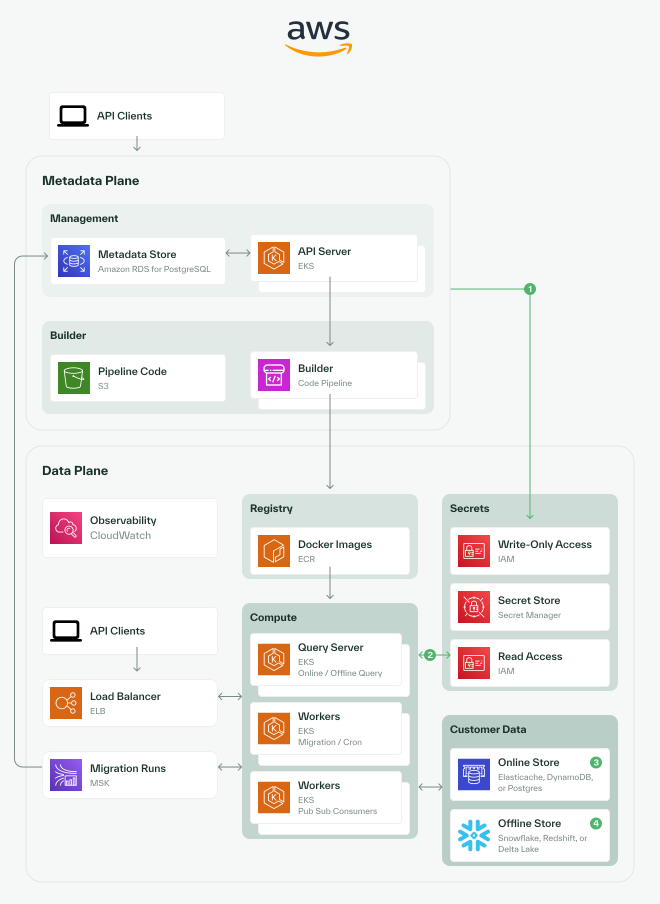
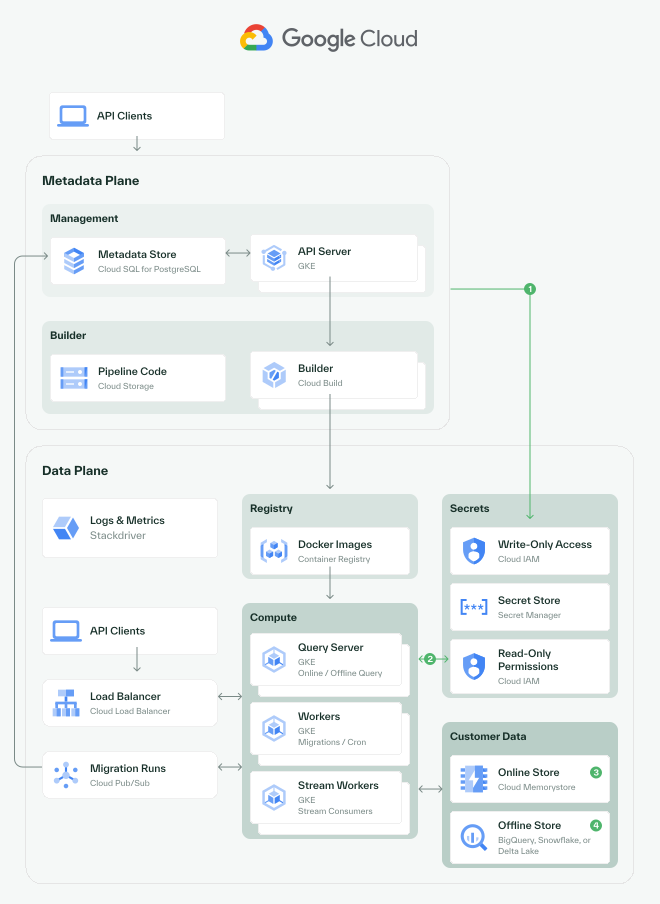
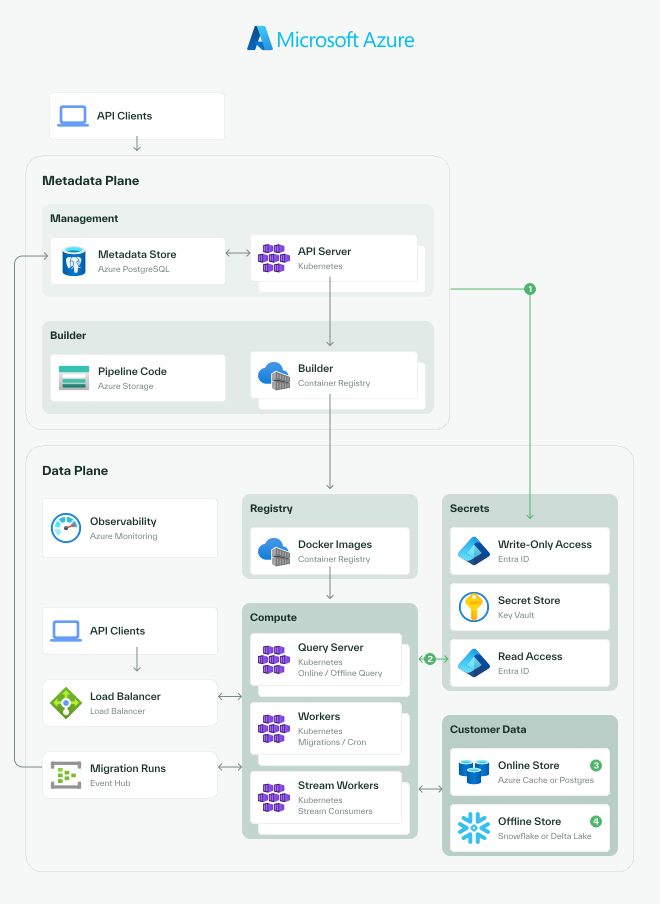
- 1Creating secrets:The API server can be configured to have write-only access to the secret store.
- 2Reading secrets:Secret access can be restricted entirely to the data plane.
- 3Online store:Chalk supports several online feature stores, which are used for caching feature values. On AWS, Chalk supports DynamoDB and Elasticache.
The Metadata Plane is a single control-plane installation that manages deployments, authentication, billing, and orchestration. Each Data Plane is an EKS cluster, controlled by the Metadata Plane, that runs the feature engineering workloads for one or more Chalk environments. The Metadata Plane and a Data Plane may share a cluster, or each Data Plane may live in its own cluster.
This guide will walk through deploying a Chalk instance in your cloud environment using Helm, an open-source package manager for Kubernetes.
Installing the Required Client Software
This guide requires a few pieces of software to be installed on your machine.
- First, begin by installing kubectl.
- Then, make sure you have installed the AWS CLI for AWS, or the gcloud cli for GCP.
- Next, install Helm.
- Finally, ensure that you are able to authenticate to your Kubernetes cluster and run
helm listto verify thathelmis installed.
Metadata Plane
The Metadata Plane is the Chalk control plane. It manages deployments, authentication, billing, and orchestrates resources across one or more Data Planes. The instructions in this section describe an AWS EKS installation of the Metadata Plane.
Configuring the AWS Environment for the Metadata Plane
Before you can deploy the Metadata Plane, you will need to provision the underlying AWS resources. Work with your Chalk support team to create the following components.
Amazon RDS (PostgreSQL)
The Metadata Plane stores its configuration, deployment history, and team/project/environment metadata in PostgreSQL.
- An RDS PostgreSQL instance with automated backups (7-day retention recommended)
- The following PostgreSQL extensions enabled:
auto_explainpg_stat_statementspg_cron
- A default database (commonly named
chalk) - A default username (commonly
chalk) - A security group that permits ingress from the EKS cluster’s VPC CIDR ranges
Amazon SQS Queues
The Metadata Plane uses SQS to drive asynchronous workflows. Provision the following queues:
| Queue | Purpose |
|---|---|
metric-check-trigger | Metric validation workflows |
scheduled-resolver-trigger | Scheduled resolver execution |
scheduled-query-trigger | Scheduled query execution |
batch-status | Batch processing status updates |
argo-builds | Workflow build notifications |
batch-report | Batch processing reports |
heartbeat | Service health monitoring |
IAM Role for the Metadata Plane API Server
The Metadata Plane API server requires an IAM role bound to its Kubernetes service account via IRSA (IAM Roles for Service Accounts).
Trust policy — bind the role to the EKS OIDC provider with the following service account:
- Kubernetes namespace:
chalk-metadata - Service account:
chalk-metadata-plane - Audience:
sts.amazonaws.com
Permissions — the role requires the following actions:
s3:*— access source code and datasetsecr:*— view and pull container imagessqs:*— interact with the deployment queues listed aboveiam:GetContextKeysForPrincipalPolicyandiam:SimulatePrincipalPolicy— check the role’s effective SQS permissions without executing the simulated actions; scope these actions to this Metadata Plane IAM role’s ARNsts:AssumeRole— assume customer roles for accessing Data Plane resources
Configuring Kubernetes Resources for the Metadata Plane
Before installing the Helm chart, create the namespace and the secret that holds the database connection information.
Namespace
Create a namespace for the Metadata Plane:
kubectl create namespace chalk-metadataDatabase Secret
The Metadata Plane reads its database connection information from a
Kubernetes secret named metadata-plane-secrets in the chalk-metadata
namespace. Create a file (do not check it in) named
metadata-plane-secrets.env with the following keys:
POSTGRES_USER=chalk
POSTGRES_PASSWORD=<your-rds-password>
POSTGRES_HOST=<your-rds-endpoint>
POSTGRES_DB=chalk
Then create the secret from the file:
kubectl create secret generic metadata-plane-secrets \
  --namespace chalk-metadata \
--from-env-file metadata-plane-secrets.envAuthenticating to the Chalk Private Helm Registry
Next, authenticate to the Chalk Private Helm Registry so that you can access Chalk Helm charts.
- Provide your AWS Account ID or Google Project ID to your Chalk representative. IAM principals in your account will be granted permission to access Chalk’s private registries.
- Authenticate to the Chalk registry:
To authenticate in AWS using an IAM role, run the following command:
aws ecr get-login-password --region us-east-1 \
  | helm registry login --username AWS --password-stdin 754784422779.dkr.ecr.us-east-1.amazonaws.com
For GCP, please configure your gcloud cli by following the Google Documentation
with the following location:
us-docker.pkg.devTo verify that you are properly authenticated, you can perform a dry run of templating the Chalk Metadata Plane Helm chart. This command will print an error, because we have not configured important values for this chart, but this failure indicates that you are properly fetching the chart and attempting to render it.
To check on AWS, run:
helm template chalk-metadata-plane oci://754784422779.dkr.ecr.us-east-1.amazonaws.com/charts/chalk-metadata-planeon GCP, run:
helm template chalk-metadata-plane oci://us-docker.pkg.dev/chalk-prod/charts/chalk-metadata-planeThese commands will fail with a message like this:
Pulled: 754784422779.dkr.ecr.us-east-1.amazonaws.com/charts/chalk-metadata-plane:0.1.2
Digest: sha256:15774ef462c772af0496e1af768529e13503c5b7a5513b5a4d2f75359bddc7ea
Error: execution error at (chalk-metadata-plane/templates/frontend/deployment.yaml:2:4): Value chalk.metadata.frontend.image is required
This error is expected, as we have not yet configured the chart. If you see this error, you are ready to proceed.
Configuring your values file
Next, we will configure the values file for the Chalk Metadata Plane. This file will contain all the necessary configuration for your Chalk deployment.
- Create a new file called
values.yamland copy the following contents into it:
chalk:
  metadata:
    # Your API host. Chalk's default host is api.chalk.ai,
    # but you will need to configure one for your instance.
    api_host: <YOUR API HOST, e.g. https://api.chalk.ai>
    # Your frontend host. Chalk's default host is chalk.ai,
    # but you will need to configure one for your instance.
    frontend_host: <YOUR FRONTEND HOST, e.g. https://chalk.ai>
    frontend:
image: <YOUR FRONTEND IMAGE>Note: <YOUR FRONTEND IMAGE> will be provided by Chalk.
Configuring your database seeding
Next, we will configure the database seeding for the Chalk Metadata Plane. This file contains the team, project, and environment configuration, and initial users for your Chalk deployment.
Note: this is just a skeleton for the initial bootstrap of the system - please use the Chalk Terraform Provider to define environments, projects, and other Chalk-to-cloud infrastructure bindings for your data planes.
- Create a new file called
seed.yamland copy the following contents into it:
chalk:
  metadata:
    seed:
      teams:
        # lowercase, less than 10 characters, no spaces or special characters.
        - id: teamshortid
          name: Your Company Name
      projects:
        # lowercase, less than 10 characters, no spaces or special characters.
        - id: projectshortid
          name: Your Project Name
          team_id: teamshortid
      environments:
        # lowercase, less than 10 characters, no spaces or special characters.
        - id: envshortid
          name: Development
          project_id: projectshortid
          team_id: teamshortid
      team_invites:
        - id: "seed_invite_1"
          team: teamshortid
          email: "your@email.com"
role: ownerConfiguring Google OIDC
Chalk supports various forms of SSO — OIDC, SAML, and others. For this guide, we will configure Google OIDC.
Create a file named oidc.env, and add the following contents. Do not check this file in:
GOOGLE_CLIENT_ID=YOUR_GOOGLE_CLIENT_ID
GOOGLE_CLIENT_SECRET=YOUR_GOOGLE_CLIENT_SECREET
Then, create a Kubernetes secret with this file:
kubectl create secret generic chalk-frontend-secrets \
  --namespace chalk-metadata \
--from-env-file frontend-secrets.envDeploying the Chalk Metadata Plane
Now that you have configured your values file and your database seeding, you can deploy the Chalk Metadata Plane.
helm install chalk-metadata-plane oci://317932201237.dkr.ecr.us-east-1.amazonaws.com/charts/chalk-metadata-plane \
  --namespace chalk-metadata \
  --values values.yaml \
--values seed.yamlVerifying the installation
To verify that the installation was successful, you can run the following command:
kubectl get pods -n chalk-metadataYou should see pods starting up in your namespace. If you see any errors, you can run kubectl describe pod <podname>
to get more information.
Once your pods are started, visit the frontend_host you configured in your values.yaml file to see the Chalk
frontend. You should be able to log in.
Data Plane
A Data Plane is an EKS cluster that runs Chalk feature engineering workloads (resolver execution, query serving, model inference). Each Chalk environment is largely tenant in a single Data Plane cluster, but a single account may have any mapping of Data Plane clusters to Chalk environments.
A Data Plane cluster may be the same EKS cluster that hosts the Metadata Plane, or it may be a separate cluster. The Data Plane cluster is managed by the Metadata Plane: once the cluster and supporting AWS resources exist and the Metadata Plane is granted appropriate access, the Metadata Plane will provision per-environment IAM roles, IRSA bindings, and other resources automatically. There is no environment-level IaC to maintain.
Configuring the AWS Environment for the Data Plane
IAM Federation
Configure an AWS role for Chalk according to the AWS Cloud Deployment guide. This role must have a cluster admin EKS access entry for the Data Plane cluster, so that the Metadata Plane can manage Kubernetes resources within the cluster.
Amazon S3
Provision five S3 buckets for the Data Plane:
data— feature datasource— deployed source codedataset— materialized datasetsmodel— model artifactsstages— query plan stages
Configure CORS on all five buckets to allow GET requests from
api.chalk.ai and chalk.ai (or the equivalent hosts you configured for
your Metadata Plane).
Amazon VPC
- A VPC with at least 2 private and 2 public subnets across 2 availability zones
- A NAT Gateway in each public subnet
- An Internet Gateway, if you want public subnet egress
Amazon EKS
- An EKS cluster
- A managed node group of 3–4
t3.mediuminstances to run background OSS controllers - A public API endpoint, with the Chalk control plane IPs allowlisted (see Static IPs)
Chalk uses standard EKS with Karpenter for scheduling, on AL2023 nodes. EKS Autopilot is supported but has been buggy in practice; because Autopilot is a fork of upstream EKS, it is markedly harder to troubleshoot, so standard EKS is recommended.
DNS (Route 53)
Provision a Route 53 hosted zone per cluster. Each cluster needs its own
zone so that it can manage cluster-level DNS records. Chalk uses
external-dns and cert-manager to automate DNS and certificate
management, and routes traffic via Envoy Gateways with Let’s Encrypt
signed certs.
Amazon MSK (Kafka)
Chalk uses MSK for background message processing. An MSK cluster may be shared across multiple Chalk Data Plane clusters; each cluster will use its own set of topics, and must be able to route to the MSK cluster.
- An MSK cluster with one broker per private subnet
- SASL/SCRAM authentication, with credentials stored in AWS Secrets Manager — persistence workloads use these credentials to authenticate to Kafka
Helm Charts in the Data Plane Cluster
The Data Plane cluster relies on a number of open-source Helm charts. Install the following charts:
| Chart | Version | Purpose |
|---|---|---|
| ArgoWorkflows | 0.45.27 | In-cluster workflows |
| KEDA | 2.11.1 | Event-driven autoscaling |
| Metrics Server | 3.12.2 | Resource metrics |
| S3 CSI Driver | 2.0.0 | S3 volume mounting |
| Envoy Gateway | 1.6.0 | API gateway |
| Cert Manager | latest | TLS certificates |
| External DNS | 1.17.0 | DNS automation |
| CloudNativePG | 0.26.0 | PostgreSQL operator |
| Karpenter | 1.0.0+ | Node autoscaling |
| EBS CSI Driver | latest | EBS volumes |
| AWS Load Balancer Controller | latest | Network load balancing |
A few notes on configuration:
cert-managerandexternal-dnsmust be configured to support the Gateway API and to watchXRouteresources. They also need Route 53 permissions to manage DNS records for the Chalk Data Plane gateway.- Karpenter setup is non-trivial; refer to the Karpenter getting-started guide.
Kubernetes Resources in the Data Plane Cluster
In each Data Plane cluster, configure:
- A Let’s Encrypt
ClusterIssuerusing a DNS-01 challenge via Route 53 - AL2023 or Bottlerocket
EC2NodeClassresources tied to the appropriate VPCs
Background Persistence
The Background Persistence component runs in the Data Plane cluster and writes query results to online and offline storage. See the Background Persistence Installation guide for the full configuration walkthrough. At minimum, provision:
- A dedicated Kubernetes namespace (traditionally
background-persistence) - A Kubernetes service account in that namespace, bound via IRSA to a dedicated IAM role
- An IAM role with the following policy:
jsonencode({
  Statement = [
    {
      Action = [
        "s3:*",                       // pull parquet files from S3
        "dynamodb:*",                 // used if the customer has a DynamoDB online store
        "secretsmanager:*",           // load secrets from AWS Secrets Manager
        "ecr:BatchGetImage",          // download persistence base images from the Chalk registry
        "ecr:GetAuthorizationToken",  // download persistence base images from the Chalk registry
        "ecr:GetDownloadUrlForLayer", // download persistence base images from the Chalk registry
        "kms:GenerateDataKey",
        "glue:*"                      // Iceberg offline store
      ]
      Effect   = "Allow"
      Resource = "*"
    },
  ]
})Environment Provisioning
Each Chalk environment is provisioned and managed by the Metadata Plane, so per-environment infrastructure does not require IaC. When an environment is created from the Chalk UI, the Metadata Plane will automatically provision the IAM role and IRSA binding required for the environment to function within the Data Plane cluster.
Private Metadata Plane Ingress
For private deployments, the Metadata Plane ingress must be configured to allow access from the Metadata Plane to the Data Plane clusters. This involves creating a PrivateLink gateway pointed at the Envoy Gateway service in the Data Plane cluster. Because the Metadata Plane bootstraps the Envoy Gateway via the Kubernetes API, this step is performed after the Data Plane cluster has been initially provisioned and the Metadata Plane has reconciled it.
Next Steps
Now that you have deployed the Chalk Metadata Plane and configured a Data Plane cluster, you can configure your local environment to interact with your Chalk instance.